Know the moment
your mail arrives.
DeliverBeep sends a notification to your phone as soon as someone opens your mailbox. No more walking down to an empty box, and no parcel left waiting.
- Free app
- No account
- No ads or tracking
How it works
From the lid to your pocket in a second
Three parts work together: a transmitter on the mailbox lid, a base station inside your home and the app on your phone.
The lid opens
When the postman drops something in, the small battery transmitter on the lid sends a short radio signal.
The base hears it
The base station in your home picks up the signal, beeps, shows it on its screen and passes it on over your WiFi.
Your phone beeps
Every phone that follows that mailbox gets a notification right away, even when the app is closed.
The hardware
Simple to fit, nothing to wire
The transmitter sticks inside the lid and the base station sits anywhere indoors within radio range, plugged in and on your WiFi.


The app
Everything you need, nothing you don't
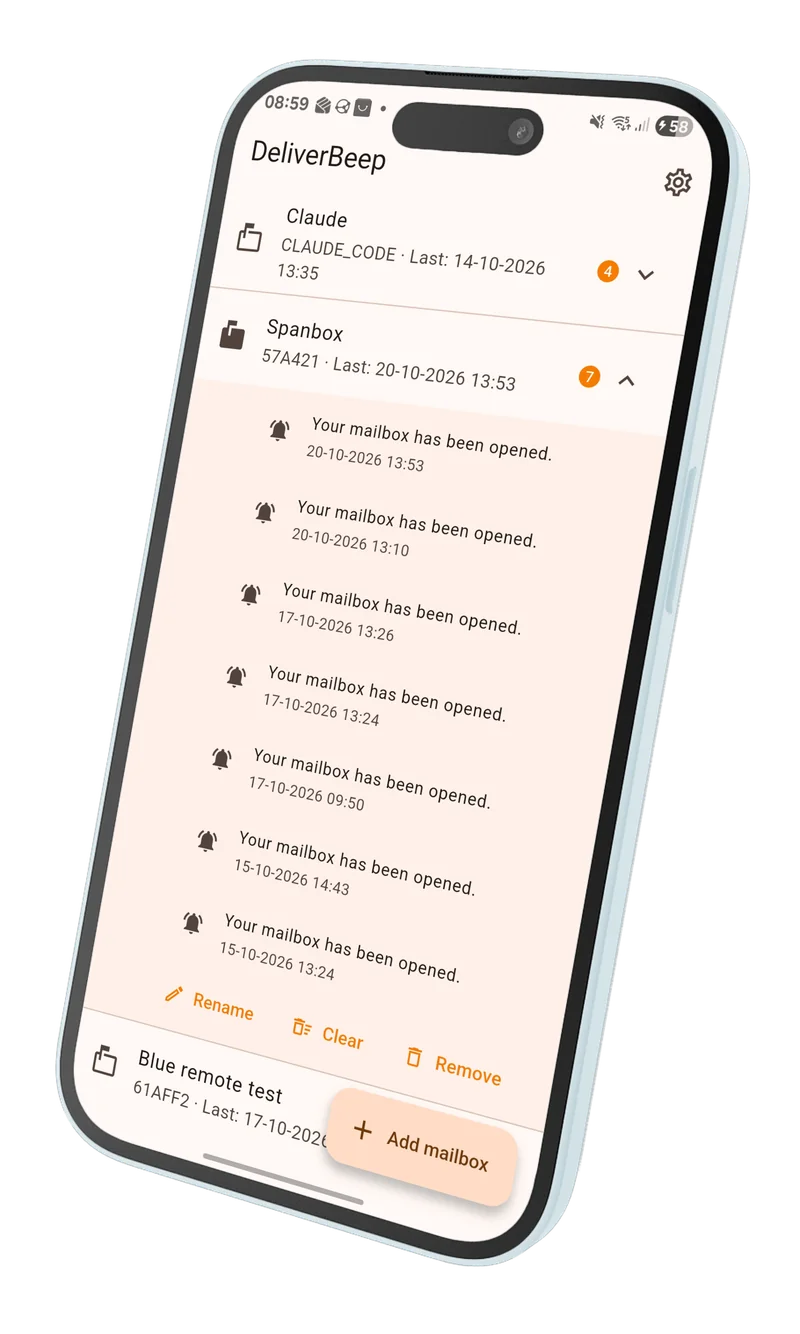
Scan the QR code on the base station and the app follows your mailbox. Share it with your household so everyone knows.
- Instant notificationsSound and banner the moment the lid opens.
- Several mailboxesFollow more than one and give each its own name.
- HistorySee when each mailbox was opened, with date and time.
- The whole householdAny number of phones can follow the same mailbox.
- Delivery ticksThe base station shows when a notification arrived and was read.
- Private by designNo account, no e-mail address, no ads, no analytics.
Support
Questions and answers
How do I add my mailbox to the app?
Scan the QR code on the base station screen with your phone camera. If the app doesn't pick it up, open the app, tap Add mailbox and type the mailbox ID shown on the base station.
Can my whole family get the notifications?
Yes. Everyone installs the app and adds the same mailbox, by scanning the QR code or typing the ID. There's no limit on the number of phones.
Do I need to create an account?
No. The app has no accounts and asks for no e-mail address or phone number. Your mailboxes and history are stored only on your phone.
I don't get any notifications. What should I check?
Make sure notifications for DeliverBeep are allowed in your phone settings, and that the base station is connected to your WiFi (its screen shows the connection). Opening the lid should also make the base station beep.
Does it work on iPhone and Android?
Yes. The app is free on the App Store and on Google Play.
Still stuck? Mail us at info@ledscount.com.

Never miss a delivery again
Get the free DeliverBeep app and add your mailbox in seconds.